


What Happens When Systems Don't Work Together Properly
In mechanical engineering, company and contact data, quotes, orders, installed machines, service cases, and commerce information belong together. If they are spread across multiple systems, it creates inconsistent information, duplicate entries, and longer processing times. Data quality must therefore be secured system-wide.
It becomes particularly critical when speed is essential. The more information employees need to gather, the longer requests take to process. At the same time, even well-maintained data loses quality if it isn’t kept up to date across systems.
The Typical System Landscape: ERP at the Center, CRM Alongside
We repeatedly see that in companies, the ERP system is the leading system for orders, invoices, and central master data. The CRM operates alongside it – often supplemented with Excel lists, Outlook information, and legacy systems. This creates multiple parallel truths about the same customer company.
Many companies initially react to this challenge by adding additional interfaces. Additional interfaces transfer data but do not create end-to-end integration. For that, responsibilities and process logic must also be linked – from the first contact to service and follow-up business.
The Seven Most Important Data Flows Between CRM and ERP
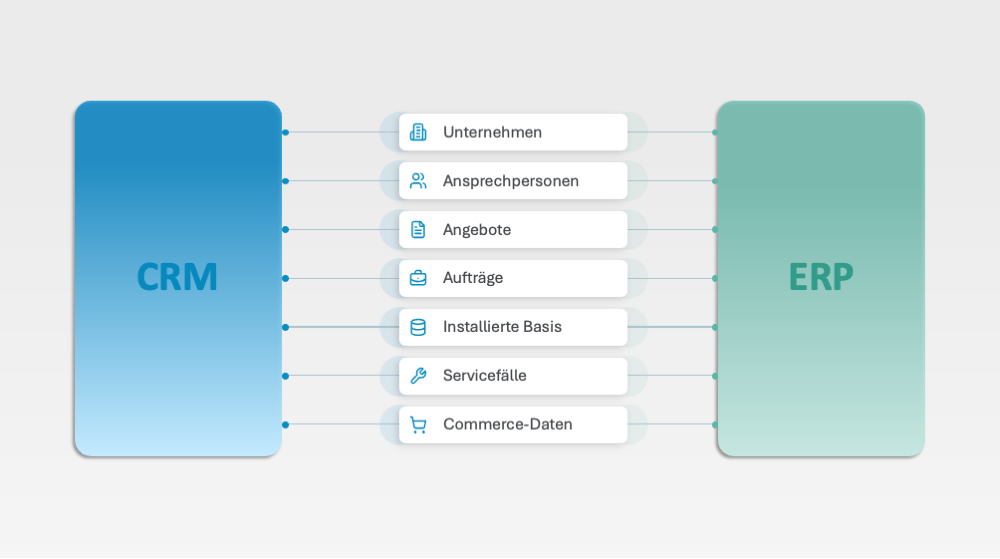
Those who integrate CRM and ERP meaningfully should initially focus on the data that makes the biggest difference in daily operations. In mechanical engineering, the following seven data flows are particularly relevant:
1. Companies
Company data underpins all sales and commercial processes. It must be uniquely and consistently defined in all participating systems.
2. Contacts
Contact details, roles, and responsibilities should be available to all relevant areas and kept up to date.
3. Quotes
Quotes connect sales activities in the CRM with prices, articles, and commercial data from the ERP.
4. Orders
After closing a deal, the order must be processed without interruption. At the same time, the sales team needs transparency about order status, delivery dates, and turnover.
5. Installed Base
The machine installed at the customer company is the central point of contact for maintenance, service, spare parts, and follow-up business.
6. Service Cases
A shared service history shows which topics are currently relevant, which services have already been provided, and where further action is needed.
7. Commerce Data
Orders, requests, and interactions from digital channels complement the customer view and make new needs visible.
The transitions from quote to order and the view of the installed base are particularly relevant because they connect forecasting, service, and follow-up business.
What a Good Integration Changes in Daily Operations
- Master data is maintained once and used across the system.
- Sales and service work with the same information base.
- Quotes, orders, and machines are traceable end to end.
- Customer inquiries can be answered faster and more thoroughly.
How to Recognize When Integration Is Necessary
The need for integration usually manifests as increasing coordination effort, unreliable forecasts, or growing service and commerce processes. Frequently, up-to-date, system-wide available data is missing. Additional single interfaces often provide only short-term help; in the long term, you need a clear integration architecture.
Where You Should Start
The best starting point is the data flows sales and service use most: master data, quotes, and orders. For each, clarify:
- Which system holds the data?
- Who is responsible for its quality?
- In which direction is it transferred?
- When and through what event does the update occur?
Once these basics are clarified, machine, service, and commerce data can follow step by step. The goal isn’t to rebuild the entire system landscape immediately. A pragmatic approach is more sensible: start with relevant processes, clarify responsibilities, and gradually expand the integration.

Would You Like to Bring CRM, ERP, and Commerce Together on a Single Platform in Your Company?
In our Experience Video, you can see how end-to-end customer processes support sales and service.
AI Agents Need Integrated Data – and a Clear Process
AI agents can summarize information, identify missing details, suggest next steps, or pre-qualify service cases. For this, they need integrated data on quotes, orders, machines, and service histories. Otherwise, their results will remain incomplete.
At Arineo, we always start with the business process, not the tool. Drawing on our years of process, CRM, and ERP experience, we identify meaningful deployment points and assess the data foundation, integrations, responsibilities, and measurable added value. Only then do we integrate AI agents into the existing system landscape.
Examples include processing incoming orders, recording visit and service reports, or checking master data. The goal is not “as much AI as possible,” but demonstrable relief in the process.
Dynamics 365 as a Platform for CRM, ERP, and Commerce
With a platform like Microsoft Dynamics 365, you can consistently map data and processes. Participating areas can access master data, the CRM can see invoice flows from the ERP, and service can access machine and service histories.
Commerce processes can also be integrated. This makes it clear which products, spare parts, or services customer companies order or request independently. Sales, service, and management work with a common information base.
This transparency is not only important for day-to-day operations but also lays the foundation for supplying AI agents with the necessary context and integrating them directly into existing workflows.
What Happens When Existing Systems Reach Their Limits
Older CRM systems, heavily customized solutions, and Excel-based processes can function for many years. However, they often reach their limits as requirements grow, data volumes increase, and response times shrink.
Integration then becomes more than a technical task. It becomes a strategic decision about how customer processes will be designed, controlled, and developed in the future. Questions about data quality, sales control, and the meaningful use of AI are linked together.
Mini Check: How Integrated is your System Infrastructure?
- Is There a Central and Consistent View of the Customer Company?
- Are quotes and orders traceable end-to-end?
- Do sales and service work with the same data basis?
- Is the installed base completely visible?
- Is information maintained in multiple systems manually?
- Can AI applications access complete and up-to-date process data?
Conclusion: Integration determines speed and quality
End-to-end CRM-ERP integration reduces coordination, improves forecasts, and accelerates customer processes. Clearly defined data flows are crucial, rather than constantly creating new single interfaces. This simultaneously lays the foundation for AI agents with concrete process benefits.

